> ## Documentation Index
> Fetch the complete documentation index at: https://support.myapps.ai/llms.txt
> Use this file to discover all available pages before exploring further.
# PhotonCraft
> Generate high-quality images with Luma Photon models
 # PhotonCraft: Master AI Image Generation with Luma Photon
Dive into the future of visual creation with PhotonCraft, powered by Luma Labs' revolutionary Photon models! Generate stunning, high-quality images with unprecedented efficiency and creative control.
## What is PhotonCraft?
PhotonCraft leverages the cutting-edge **Luma Photon and Photon Flash** AI models to redefine AI image generation. Unlike traditional models, Photon models are built for **superior quality, efficiency, and cost-effectiveness**, eliminating common AI-generated image artifacts and excelling in prompt interpretation and creative control. PhotonCraft provides a platform to harness these models, enabling you to create visuals that are not only high-resolution but also deeply aligned with your artistic vision, all at a breakthrough value.
Experience significantly **lower costs** per image compared to other models.
Generate images that **outperform existing models** in quality and eliminate artifacts.
Benefit from powerful **prompt interpretation** and **creative control** features.
Utilize optimized models for **ultra-fast image synthesis**.
## Visual Showcase
Explore the diverse and high-quality outputs achievable with PhotonCraft:
# PhotonCraft: Master AI Image Generation with Luma Photon
Dive into the future of visual creation with PhotonCraft, powered by Luma Labs' revolutionary Photon models! Generate stunning, high-quality images with unprecedented efficiency and creative control.
## What is PhotonCraft?
PhotonCraft leverages the cutting-edge **Luma Photon and Photon Flash** AI models to redefine AI image generation. Unlike traditional models, Photon models are built for **superior quality, efficiency, and cost-effectiveness**, eliminating common AI-generated image artifacts and excelling in prompt interpretation and creative control. PhotonCraft provides a platform to harness these models, enabling you to create visuals that are not only high-resolution but also deeply aligned with your artistic vision, all at a breakthrough value.
Experience significantly **lower costs** per image compared to other models.
Generate images that **outperform existing models** in quality and eliminate artifacts.
Benefit from powerful **prompt interpretation** and **creative control** features.
Utilize optimized models for **ultra-fast image synthesis**.
## Visual Showcase
Explore the diverse and high-quality outputs achievable with PhotonCraft:
.jpeg) ```text theme={null}
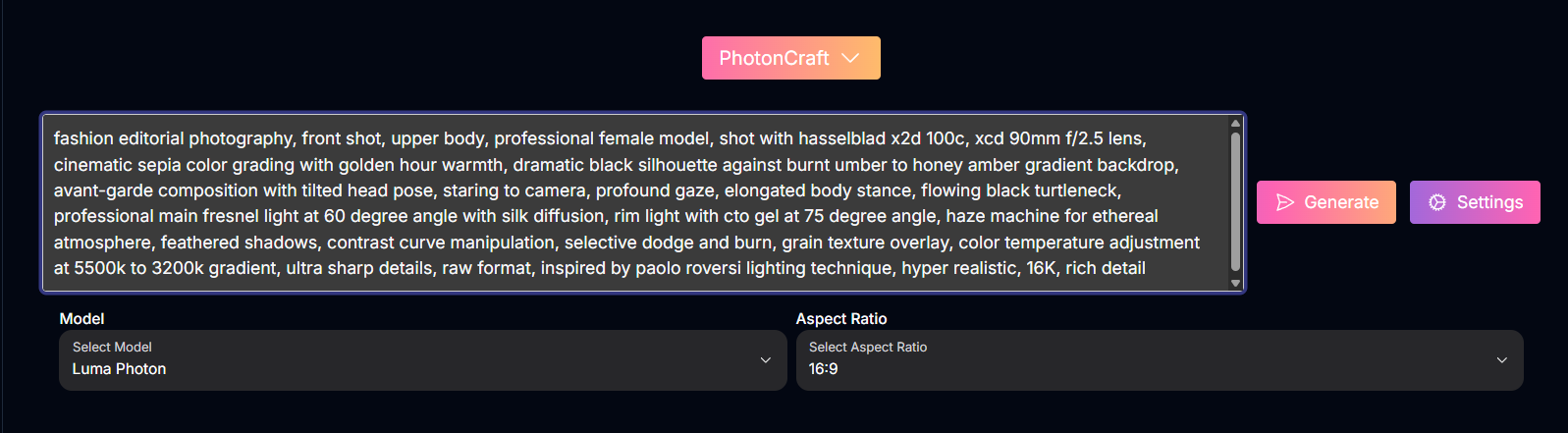
fashion editorial photography, front shot, upper body, professional female model, shot with hasselblad x2d 100c, xcd 90mm f/2.5 lens, cinematic sepia color grading with golden hour warmth, dramatic black silhouette against burnt umber to honey amber gradient backdrop, avant-garde composition with tilted head pose, staring to camera, profound gaze, elongated body stance, flowing black turtleneck, professional main fresnel light at 60 degree angle with silk diffusion, rim light with cto gel at 75 degree angle, haze machine for ethereal atmosphere, feathered shadows, contrast curve manipulation, selective dodge and burn, grain texture overlay, color temperature adjustment at 5500k to 3200k gradient, ultra sharp details, raw format, inspired by paolo roversi lighting technique, hyper realistic, 16K, rich detail
```
```text theme={null}
fashion editorial photography, front shot, upper body, professional female model, shot with hasselblad x2d 100c, xcd 90mm f/2.5 lens, cinematic sepia color grading with golden hour warmth, dramatic black silhouette against burnt umber to honey amber gradient backdrop, avant-garde composition with tilted head pose, staring to camera, profound gaze, elongated body stance, flowing black turtleneck, professional main fresnel light at 60 degree angle with silk diffusion, rim light with cto gel at 75 degree angle, haze machine for ethereal atmosphere, feathered shadows, contrast curve manipulation, selective dodge and burn, grain texture overlay, color temperature adjustment at 5500k to 3200k gradient, ultra sharp details, raw format, inspired by paolo roversi lighting technique, hyper realistic, 16K, rich detail
```
.jpeg) ```text theme={null}
Rainforest tree frog realistic above view
```
```text theme={null}
Rainforest tree frog realistic above view
```
.jpeg) ```text theme={null}
Hyperdetailed photo, Mid Shot Photo, murderbot by matha wells, female, (human:robot:0.2), opaque mask, grunge, Fujifilm X-T4, Sony FE 85mm f/1. 4
```
```text theme={null}
Hyperdetailed photo, Mid Shot Photo, murderbot by matha wells, female, (human:robot:0.2), opaque mask, grunge, Fujifilm X-T4, Sony FE 85mm f/1. 4
```
.jpeg) ```text theme={null}
Close-up of a woman's face under water, shimmering light piercing and reflecting through the water on her face, eyes closed, full lips, porcelain like complexion, rainbow prismatic lighting effect, high definition, hyper realistic
```
## Mastering Prompts for PhotonCraft
PhotonCraft, powered by Luma's models, is designed as a **collaborative tool**. You don't necessarily need overly complex or descriptive prompts to start. Think of your initial prompt as the beginning of a conversation, an idea you'll refine and expand upon. Photon models excel at **interpreting natural language** and allow for **iterative editing**, making the prompting process more intuitive and less rigid.
### Prompting Philosophy & Techniques
Begin with a clear, concise idea. Photon models are designed to understand and expand on your initial input.
*Example:* Instead of a highly detailed scene, start with "A bustling London street at golden hour."
Photon models handle both photorealistic and imaginative concepts with ease. Don't hesitate to blend realistic settings with creative elements.
### Prompt Examples
Here are some prompts used to test the Luma Photon model, showcasing its versatility and the potential for refinement:
A bustling London street at golden hour, with double-decker buses, people in business attire, and the warm glow of the setting sun reflecting off glass skyscrapers.
A tiger mid-leap in a dense Indian jungle, with sunlight streaming through the canopy and dust particles visible in the air.
A sleek, minimalist kitchen with white marble countertops, stainless steel appliances, and a bowl of fresh fruit on the island.
A cobblestone street in Paris during a rainy afternoon, with people holding colorful umbrellas and a reflection of the Eiffel Tower in a puddle.
A Swiss mountain village nestled between snow-capped peaks, with wooden chalets and smoke rising from chimneys on a crisp winter morning.
A rustic outdoor café in Rome, with cappuccinos on wooden tables, vines hanging over pergolas, and a cat lounging in the corner.
A majestic winged lion standing atop a glowing crystal mountain, with an aurora dancing across the night sky in the background.
## How to Use PhotonCraft
Embark on your creative journey and generate high-quality images with PhotonCraft:
Input your text description into the prompt field.
Choose between the **Regular** Photon model or the **Flash** model (if available). The Flash model is optimized for speed.
Choose the desired shape for your image from the available aspect ratio options.
Click the "Generate" button to create your image.
Review the generated image. If using a platform that supports iterative editing, provide feedback or adjust elements to refine the result.
## Input Parameters and Options
Here are the key input parameters and options available in PhotonCraft:
The text prompt describing the image you want to generate.
Select the Photon model to use.
Possible enum values: `Regular`, `Flash`
The desired aspect ratio for the generated image.
Possible enum values: 16:9, 9:16, 1:1, 4:3, 3:4, 21:9, 9:21
## Tips for Sculpting with PhotonCraft
Think of the AI as a creative partner. Start with an idea and work together to refine it.
Try both the Regular and Flash models to see which best suits your needs for speed and quality.
Don't settle for the first result. Use the iterative editing features to fine-tune your images.
Combine realistic elements with imaginative ones to explore unique visual possibilities.
## Conclusion
PhotonCraft, powered by Luma's innovative Photon models, offers a fresh and efficient approach to AI image generation. With its focus on value, quality, and a collaborative prompting style, it empowers creators to bring their ideas to life without technical barriers or excessive costs. Dive into PhotonCraft and experience the next evolution in AI-assisted visual creation.
***
```text theme={null}
Close-up of a woman's face under water, shimmering light piercing and reflecting through the water on her face, eyes closed, full lips, porcelain like complexion, rainbow prismatic lighting effect, high definition, hyper realistic
```
## Mastering Prompts for PhotonCraft
PhotonCraft, powered by Luma's models, is designed as a **collaborative tool**. You don't necessarily need overly complex or descriptive prompts to start. Think of your initial prompt as the beginning of a conversation, an idea you'll refine and expand upon. Photon models excel at **interpreting natural language** and allow for **iterative editing**, making the prompting process more intuitive and less rigid.
### Prompting Philosophy & Techniques
Begin with a clear, concise idea. Photon models are designed to understand and expand on your initial input.
*Example:* Instead of a highly detailed scene, start with "A bustling London street at golden hour."
Photon models handle both photorealistic and imaginative concepts with ease. Don't hesitate to blend realistic settings with creative elements.
### Prompt Examples
Here are some prompts used to test the Luma Photon model, showcasing its versatility and the potential for refinement:
A bustling London street at golden hour, with double-decker buses, people in business attire, and the warm glow of the setting sun reflecting off glass skyscrapers.
A tiger mid-leap in a dense Indian jungle, with sunlight streaming through the canopy and dust particles visible in the air.
A sleek, minimalist kitchen with white marble countertops, stainless steel appliances, and a bowl of fresh fruit on the island.
A cobblestone street in Paris during a rainy afternoon, with people holding colorful umbrellas and a reflection of the Eiffel Tower in a puddle.
A Swiss mountain village nestled between snow-capped peaks, with wooden chalets and smoke rising from chimneys on a crisp winter morning.
A rustic outdoor café in Rome, with cappuccinos on wooden tables, vines hanging over pergolas, and a cat lounging in the corner.
A majestic winged lion standing atop a glowing crystal mountain, with an aurora dancing across the night sky in the background.
## How to Use PhotonCraft
Embark on your creative journey and generate high-quality images with PhotonCraft:
Input your text description into the prompt field.
Choose between the **Regular** Photon model or the **Flash** model (if available). The Flash model is optimized for speed.
Choose the desired shape for your image from the available aspect ratio options.
Click the "Generate" button to create your image.
Review the generated image. If using a platform that supports iterative editing, provide feedback or adjust elements to refine the result.
## Input Parameters and Options
Here are the key input parameters and options available in PhotonCraft:
The text prompt describing the image you want to generate.
Select the Photon model to use.
Possible enum values: `Regular`, `Flash`
The desired aspect ratio for the generated image.
Possible enum values: 16:9, 9:16, 1:1, 4:3, 3:4, 21:9, 9:21
## Tips for Sculpting with PhotonCraft
Think of the AI as a creative partner. Start with an idea and work together to refine it.
Try both the Regular and Flash models to see which best suits your needs for speed and quality.
Don't settle for the first result. Use the iterative editing features to fine-tune your images.
Combine realistic elements with imaginative ones to explore unique visual possibilities.
## Conclusion
PhotonCraft, powered by Luma's innovative Photon models, offers a fresh and efficient approach to AI image generation. With its focus on value, quality, and a collaborative prompting style, it empowers creators to bring their ideas to life without technical barriers or excessive costs. Dive into PhotonCraft and experience the next evolution in AI-assisted visual creation.
***