> ## Documentation Index
> Fetch the complete documentation index at: https://support.myapps.ai/llms.txt
> Use this file to discover all available pages before exploring further.
# Quiet, Whisper & Duet
> Control when the Pixio companion joins your drawing and what starts an AI request.
The mode selector determines when AI is allowed to respond. You can change modes at any time without changing your local artwork.
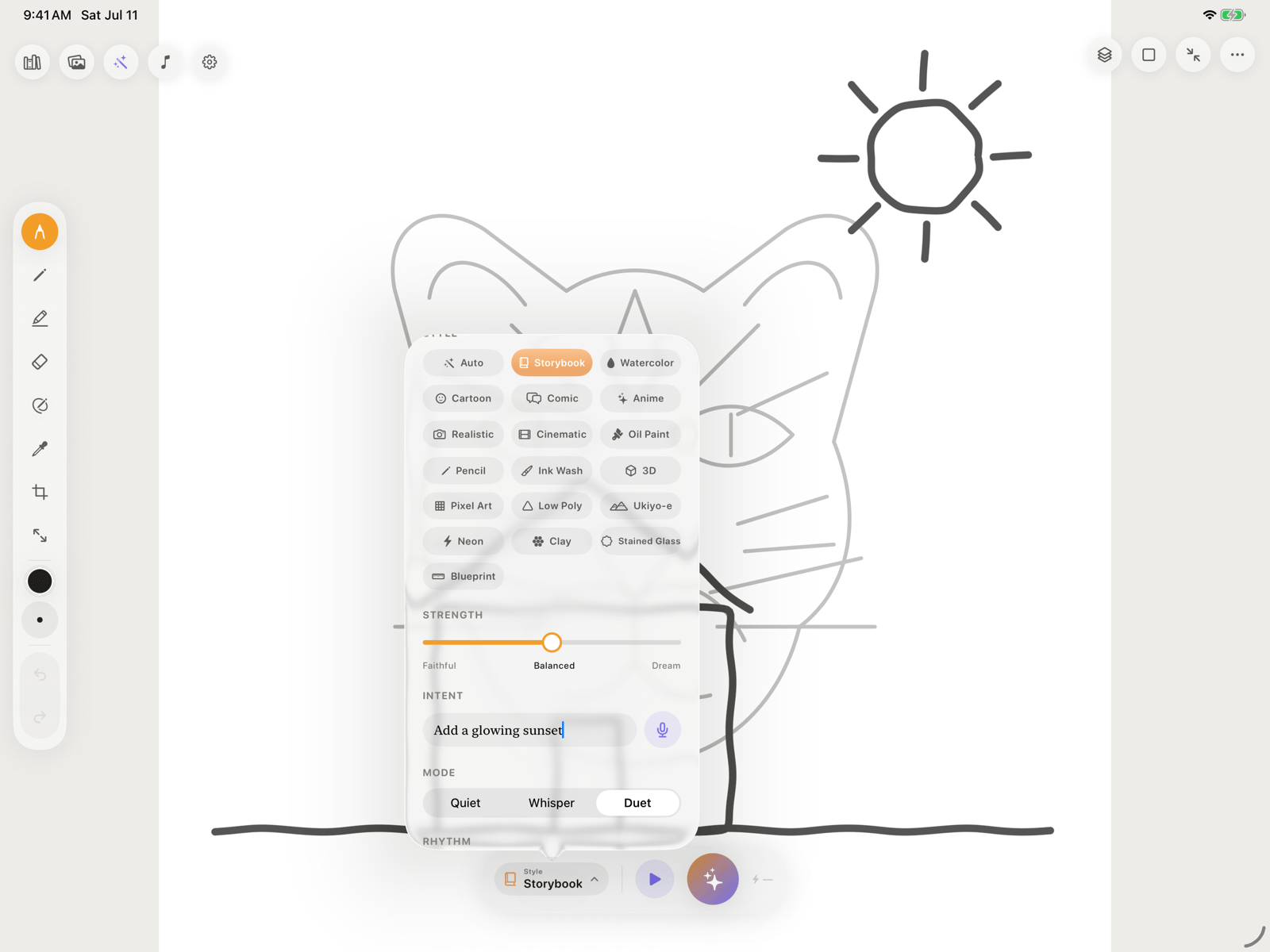 | Mode | How it behaves | Starts an AI request? |
| ----------- | ----------------------------------------------------------------- | -------------------------------------- |
| **Quiet** | Keeps the companion asleep while local drawing remains available. | No |
| **Whisper** | Waits until you tap the violet **Spark** button. | Only when you tap Spark |
| **Duet** | Responds automatically after your pencil rests. | Yes, after the selected rhythm's pause |
Whisper and Duet require a Pixio API key, network access, available credits, and permission under **Settings → AI Processing**.
If **Settings → Manual volleys only** is enabled, Duet will not start automatic turns. Use the Spark button or turn that setting off to restore pause-triggered responses.
## Quiet
Use Quiet for uninterrupted drawing, offline practice, classroom exercises, or tracing without AI. Spark, Animate, and Generate Stencil appear inactive while Quiet is selected, but local tools, layers, bundled guides, and Photo-to-Stencil remain available.
## Whisper
Whisper gives you a manual checkpoint:
Finish the portion you want the companion to see.
**Faithful** preserves more of your marks. Moving toward **Dream** gives the model more freedom.
Type a direction such as “add a glowing sunset” or use the microphone when on-device dictation is available.
Pixio Canvas snapshots the relevant artwork and starts one companion turn.
## Duet
Duet is the continuous co-drawing mode. Draw, pause, and the companion takes a turn. Choose **Flowing** for a quicker rhythm or **Patient** when you want more time between marks and a response.
You can continue drawing while a Duet request is processing. The companion result arrives as a separate layer below any newer ink, so it does not cover or replace the strokes you added while waiting.
If you want to control every request, use Whisper. If you want no AI requests at all, use Quiet.
## Styles, strength, and intent
* **Style** sets the visual direction, including Storybook, Watercolor, Comic, Pencil, and other presets.
* **Strength** balances preservation of your marks against creative freedom.
* **Intent** tells the companion what to add, change, preserve, or remove.
* **Remove** lets you mark an area you want removed when the selected model supports image editing.
* **Animate** turns suitable canvas artwork into a video with the selected Animate model.
Available models and their options come from Pixio's live catalog, so model names, completion time, formats, and credit cost can change.
## Voice intent
Pixio Canvas uses on-device speech recognition and does not fall back to server recognition. If the current language is not available on-device, type the intent instead. When you use the transcript in an AI action, the resulting text can be included in that request after AI-processing permission is granted.
| Mode | How it behaves | Starts an AI request? |
| ----------- | ----------------------------------------------------------------- | -------------------------------------- |
| **Quiet** | Keeps the companion asleep while local drawing remains available. | No |
| **Whisper** | Waits until you tap the violet **Spark** button. | Only when you tap Spark |
| **Duet** | Responds automatically after your pencil rests. | Yes, after the selected rhythm's pause |
Whisper and Duet require a Pixio API key, network access, available credits, and permission under **Settings → AI Processing**.
If **Settings → Manual volleys only** is enabled, Duet will not start automatic turns. Use the Spark button or turn that setting off to restore pause-triggered responses.
## Quiet
Use Quiet for uninterrupted drawing, offline practice, classroom exercises, or tracing without AI. Spark, Animate, and Generate Stencil appear inactive while Quiet is selected, but local tools, layers, bundled guides, and Photo-to-Stencil remain available.
## Whisper
Whisper gives you a manual checkpoint:
Finish the portion you want the companion to see.
**Faithful** preserves more of your marks. Moving toward **Dream** gives the model more freedom.
Type a direction such as “add a glowing sunset” or use the microphone when on-device dictation is available.
Pixio Canvas snapshots the relevant artwork and starts one companion turn.
## Duet
Duet is the continuous co-drawing mode. Draw, pause, and the companion takes a turn. Choose **Flowing** for a quicker rhythm or **Patient** when you want more time between marks and a response.
You can continue drawing while a Duet request is processing. The companion result arrives as a separate layer below any newer ink, so it does not cover or replace the strokes you added while waiting.
If you want to control every request, use Whisper. If you want no AI requests at all, use Quiet.
## Styles, strength, and intent
* **Style** sets the visual direction, including Storybook, Watercolor, Comic, Pencil, and other presets.
* **Strength** balances preservation of your marks against creative freedom.
* **Intent** tells the companion what to add, change, preserve, or remove.
* **Remove** lets you mark an area you want removed when the selected model supports image editing.
* **Animate** turns suitable canvas artwork into a video with the selected Animate model.
Available models and their options come from Pixio's live catalog, so model names, completion time, formats, and credit cost can change.
## Voice intent
Pixio Canvas uses on-device speech recognition and does not fall back to server recognition. If the current language is not available on-device, type the intent instead. When you use the transcript in an AI action, the resulting text can be included in that request after AI-processing permission is granted.